Demonstation Mode |
  
|
Demonstation Mode |
|
Instead of providing full control of your computer, you can run Distant Desktop in so called Demonstration mode. In this mode you provide access to your computer, but the remote control is blocked.
Your remote partners are able to view your desktop and your activities, but they cannot control a mouse or keyboard. They are allowed to send you messages in the chat, and they can talk to you.
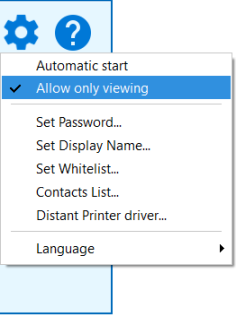
It is very easy to enable the Demonstration mode. Just turn on the "Allow Only Viewing" option in the Settings menu . In fact, you can turn on/ off this mode dynamically, at any time during a remote session.