Autostart / Unattended Access |
  
|
Autostart / Unattended Access |
|
To enable automatic start (also known as Unattended Access), please turn on the option Automatic start in the Settings menu:
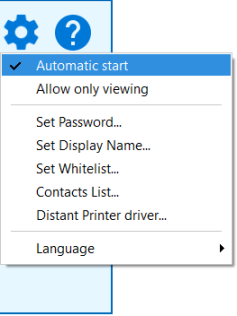
When Automatic start is enabled, the Distant Desktop will be registered as a service, and it will be automatically started with Windows boot. Therefore, it will work even on the login screen when no user is logged in yet.
In order to use unattended access you must specify a "static password" (fixed password) instead of the randomly generated one. In this case you always know ID and a password, so you can connect to this computer remotely anytime.
In order to disable Automatic start, turn off the option Automatic start in the Settings menu. The service will be uninstalled: